Bhoomi
Bhoomi RTC Online is an online land record management system launched by the Government of Karnataka.Through this portal, citizens can easily check land documents such as the RTC (Pahani), Mutation records, land ownership details and the Mutation Register (MR) without visiting government offices.
Launched in 2000, the Bhoomi portal revolutionized land management in Karnataka by replacing a century-old system of handwritten paper records with a transparent digital database.Today, Bhoomi brings complete land information directly to your fingertips—eliminating errors, ensuring total transparency, and providing secure, instant access to your land details from anywhere in the world.
Bhoomi Online Services
| Feature | Details |
|---|---|
| Portal Name | Bhoomi RTC |
| State | Karnataka, India |
| Department | Revenue Department (Government of Karnataka) |
| Launched Year | 2000 (One of India's first digital land record projects) |
| Primary Purpose | To digitize land records and provide easy access to RTC (Pahani). |
| Key Documents | RTC (Pahani), Mutation Records, Revenue Maps, Khatha Extract. |
| Main Beneficiaries | Farmers, Landowners, Property Buyers, and Legal Professionals. |
| Key Technology | Digitally signed documents (i-RTC) and GPS-linked survey maps. |
| Language Support | Kannada and English |
| Official Site | landrecords.karnataka.gov.in |
Land Record Services available on Bhoomi Portal
1. RTC Services (The Core Documents)
These services focus on the Pahani (RTC), which is the "Identity Card" of your land.
- Access RTC and MR: View the current owner, area, and land usage. "MR" (Mutation Register) shows how the land was transferred to the current owner.
- Retrieve Khatha Extract: A summary of the property tax and ownership records, often needed for urban or semi-urban property identification.
- i-RTC & Wallet: i-RTC is a digitally signed, official version of your land record. The i-Wallet allows you to maintain a balance on the portal to pay for these documents instantly without using a debit card every time.
2. Report Services (Transparency & Data)
These services help you perform "due diligence" to ensure a piece of land is safe to buy or has no legal issues.
- Dispute Case Tracking: Check if there are any active court cases or disputes registered against the survey number.
- Bagair Hukum & Form 57: These relate to the regularization of unauthorized cultivation on government land. If someone has applied to "legalize" their farming on government land, those records are found here.
- Land Beat Monitoring: A security feature where revenue officials visit plots to ensure there is no encroachment on government property.
- Aadhaar Seeding: Shows if the landowner's Aadhaar is linked to the land record, which prevents fraudulent sales by imposters.
3. Land Conversion Services (Changing Land Use)
If you want to build a house, factory, or shop on agricultural land, you must "convert" its legal status.
- Online Application: You can apply for conversion using a notarized affidavit instead of visiting the Deputy Commissioner's office multiple times.
- Download Final Orders: Once approved, the official Conversion Order (which is a vital legal document for any future layout) can be downloaded directly.
4. Survey [SSLR] Services (Mapping)
Handled by the Survey Settlement and Land Records (SSLR) department, these services deal with the physical boundaries.
- Revenue Maps: Detailed maps of the entire village showing how different survey numbers fit together.
- Tippan/Atlas/Pakka Book: These are the technical "blueprints" of a specific survey number created by a surveyor.
5. Additional & Technical Services
- Mojini Services: A system for requesting and tracking new surveys or the partitioning of land (splitting a big plot into smaller ones).
- Parihara: The portal used to distribute compensation to farmers for crop loss due to natural disasters (floods/droughts).
- Dishaank App: A mobile app that uses your phone's GPS to tell you exactly which survey number you are standing on in real-time.
- EODB Services: "Ease of Doing Business" links, helping industries quickly verify land details for setting up businesses.
Fee Structure for 2026
| Service Name | Purpose | Fee (Approx.) |
|---|---|---|
| RTC (Pahani) View | For information/checking details only. | Free |
| i-RTC (Certified Copy) | Legally valid document for banks and courts. | ₹15 |
| Mutation Extract | Official proof of ownership transfer. | ₹15 |
| Mutation Status | Tracking a pending transfer application. | Free |
| Revenue Map | Viewing or downloading village maps. | Free |
| Tippan (Survey Sketch) | Detailed survey drawing of a specific plot. | ₹15 |
| Land Conversion | Applying to use farm land for buildings. | Variable (Based on area) |
Key Features of the Portal
The portal digitizes over 20 million records, offering citizens a "single-window" to access critical land documents:
- RTC (Record of Rights, Tenancy, and Crops): Also known as Pahani, this is the most important document. it contains the owner's name, survey number, land area, soil type, and details of crops grown.
- Mutation Services: When land changes hands (through sale or inheritance), the record must be updated. Bhoomi allows users to apply for these changes (Mutation) and track their status online.
- Revenue Maps: Users can view and download village maps to see the physical boundaries and layout of their land.
- Dispute Case Tracking: The portal lists any ongoing legal disputes or "pendency" cases related to a specific survey number, helping buyers avoid fraudulent deals.
- Land Conversion: It facilitates the legal process of converting agricultural land for non-agricultural use (residential or commercial).
Bhoomi RTC: Common Problems & Fixes
| Common Issue | What is Likely Happening? | The Practical Solution |
|---|---|---|
| "Record Not Found" | Incorrect Survey/Hissa number or the village has been renamed in the system. | Double-check your Sale Deed. Try searching by the Owner's Name instead of the Survey Number to verify the entry. |
| Pending Mutation | "The 30-day objection period is over, but the officer hasn't ""cleared"" the digital file." | Check your Mutation Status online. If stuck, visit your local Janasnehi Kendra with your Transaction ID for a manual push. |
| Name Spelling Errors | A typo was made during the manual entry of old paper records into the digital database. | "This requires a ""Rectification Application."" Visit the Taluk office with your Aadhaar and original Deed to request a correction." |
| "Payment Success, No RTC" | The browser was closed too early or the server timed out after the bank transaction. | "Go to the ""Check Payment Status"" or ""Re-print RTC"" section. Don't pay twice! The system usually updates within 24 hours." |
| Old Data Showing | "You are looking at an old ""Period."" The system defaults to the current year, but data syncs can lag." | Ensure you have selected the Current Year and Tenancy from the dropdown menu to see the most recent updates. |
| Portal Not Loading | High traffic is overwhelming the government servers (common during 11 AM – 4 PM). | "Try accessing the portal during ""Off-Peak Hours"" (early morning before 9 AM or late at night). Use Incognito/Private mode in your browser." |
| Bank Won't Accept RTC | "You are likely using the ""Free View"" version which lacks a digital signature." | "Download a ""Certified Copy"" by paying the ₹15–₹25 fee. Only the digitally signed version with a QR Code is legally valid for loans." |
Why is it Important for Citizens?
Before Bhoomi, accessing land records often required long journeys to government offices and was prone to delays or manual errors. Today, the portal offers:
- Transparency: By allowing anyone to verify ownership independently, it reduces corruption and the risk of land fraud.
- Empowerment for Farmers: Having a digital RTC makes it much easier for farmers to apply for bank loans, claim crop insurance, or receive government subsidies.
- Legal Security: Digitized records are much harder to tamper with than physical books, ensuring that a person's "Record of Rights" is safe and authenticated.
- Convenience: Karnataka citizens can now manage their property assets from their own homes or a local kiosk.
Steps to Check RTC (Pahani) on Bhoomi Online
To check the Record of Rights, Tenancy, and Crops (RTC)—commonly known as the Pahani—online through the Bhoomi portal, follow these steps:
-
Visit the Bhoomi Portal:
Open your web browser and go to the official
Bhoomi website
.

- Select ‘View RTC and MR’: On the homepage, locate and click the option for viewing the RTC or Pahani.
-
Choose Your District:
On the next page, select your district from the dropdown menu.
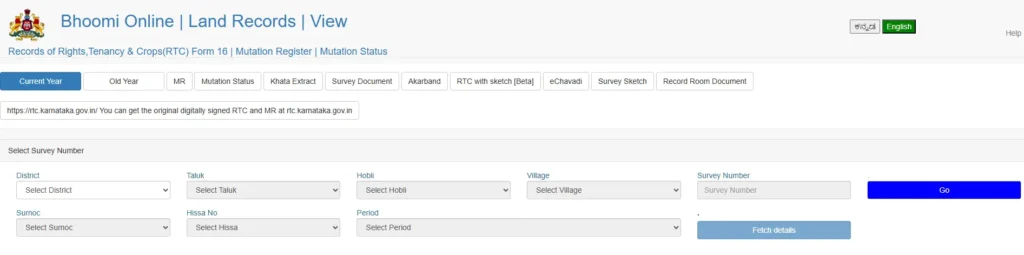
- Select the Taluk: Once the district is selected, choose the specific Taluk where your land is located.
- Choose the Hobli: Next, select the Hobli (the sub-division of the Taluk) associated with your land.
-
Select the Village:
From the list provided, choose the village where the land is registered.
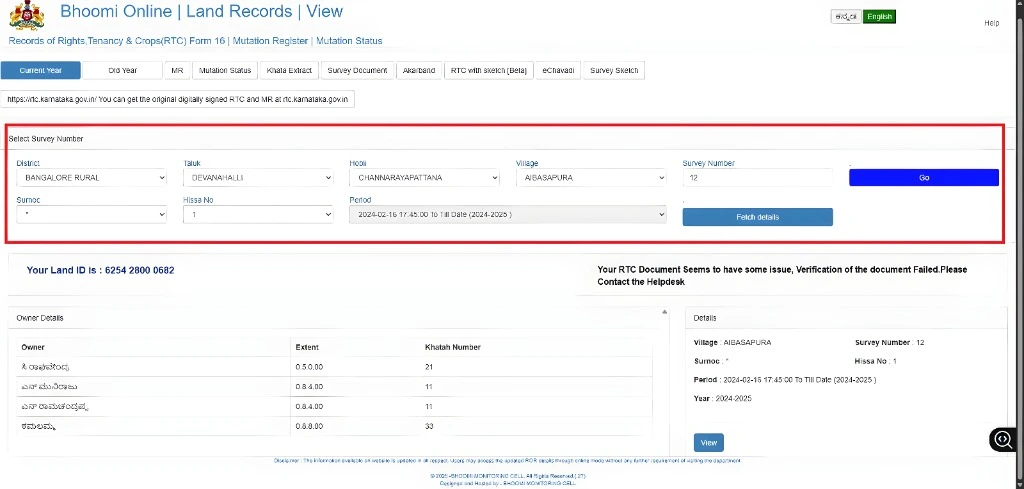
- Enter the Survey Number: Input the survey number of your land. This number is essential for locating your specific record. After entering it, click 'Fetch Details.'
- Select the Surnoc and Hissa Number: If applicable, choose the specific sub-division (Hissa) of the land from the dropdown menu.
-
View the RTC:
Click on ‘View’ or ‘Fetch’. Your RTC document will be displayed on the screen. You can review the details and, if needed, print the document for your reference.
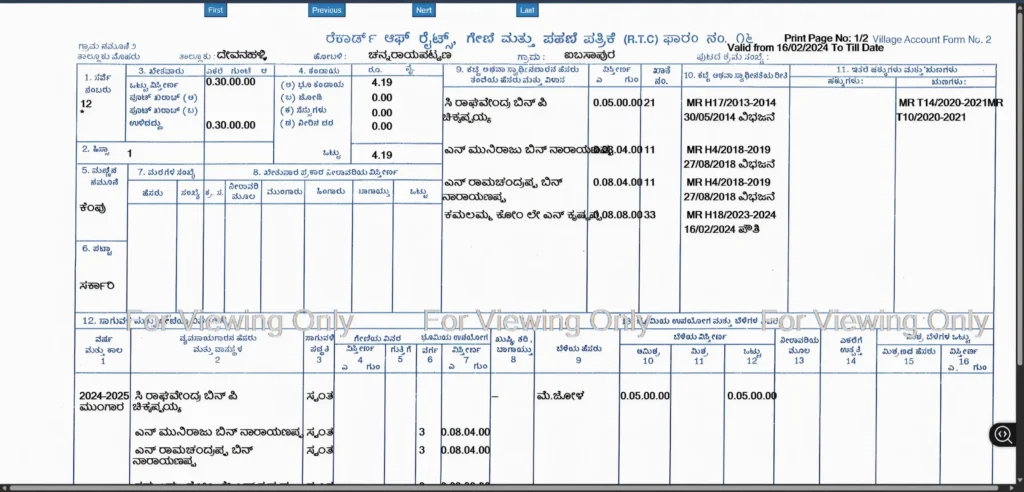
By following these steps, you can instantly access your land records through the Bhoomi portal without needing to visit a government office.
How to Extract a Mutation Report on the Bhoomi Online Portal
To retrieve a Mutation Report (MR) from the Bhoomi Online portal, follow these steps:
- Access the Bhoomi Portal: Start by visiting the official Bhoomi website . On the homepage, locate and click the option for 'View RTC and MR'.
- Select the 'MR' Tab: Once the new page opens, you will see two tabs: 'RTC' and 'MR'. Click on the 'MR' (Mutation Report) tab to proceed.
- Enter Land Details: Fill in the required fields from the dropdown menus, including your District, Taluk, Hobli, and Village.
- Input Survey Number: Enter the specific Survey Number for the land you are checking.
- Fetch Details: After entering the survey number, click the 'Fetch Details' button. This will populate a list of mutation numbers associated with that land.
- View the Report: Select the specific Mutation Number you wish to see and click 'Preview' or 'View'. The Mutation Report will be displayed, showing the history of ownership changes and the transaction details.
Following these steps will allow you to access and review your Mutation Report easily from anywhere.
Steps to Check Mutation Status on Bhoomi Online
To check the Mutation Status of your land records on the Bhoomi Online portal, follow these steps:
- Visit the Bhoomi Portal: Open your web browser and navigate to the official Bhoomi website .
- Select ‘View RTC and MR’: On the homepage, click the link labeled “View RTC and MR”.
-
Navigate to the Mutation Status Tab:
Once the page loads, you will see multiple tabs at the top. Click on the tab specifically labeled “Mutation Status”.

- Enter Required Details: Select your District, Taluk, Hobli, and Village from the dropdown menus. Then, enter the Survey Number for which the mutation was applied.
-
Fetch Details:
Click on the “Fetch Details” button to retrieve the information from the database.
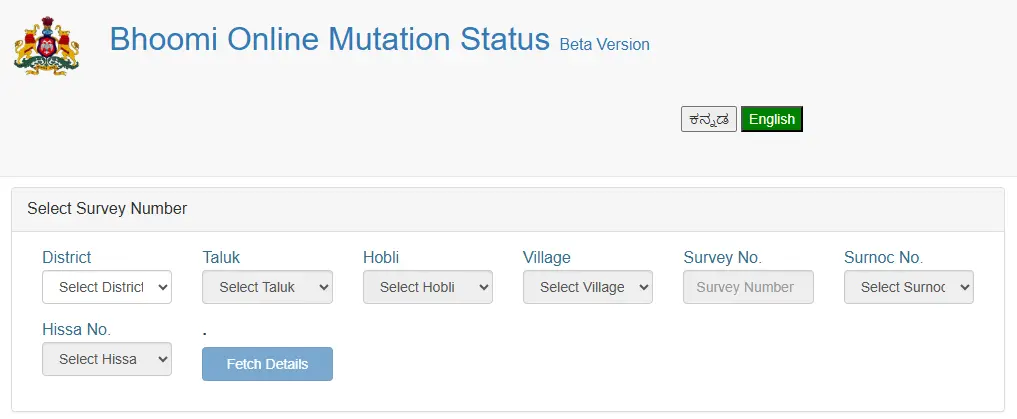
- View Status: The system will display a list of mutation applications. Click on the specific application to see its current status (e.g., "Pending," "Accepted," or "Rejected").
- Download or Print: If you need a physical copy for your records, you can use your browser’s print option or the download button if available.
By following these steps, you can easily track the progress of your land title transfer through the Bhoomi portal without needing to visit the Taluk office.
Steps to Check Revenue Maps on Bhoomi Online
Users can access detailed village and land maps through the Bhoomi Online portal by following these steps:
- Access the Revenue Map Section: Visit the official Bhoomi website . On the homepage, scroll down to the Survey Services (SSLR) section and select 'Revenue Maps'.
-
Enter Search Criteria:
A new window will open. Select your District, Taluk, Hobli, and Village from the dropdown menus.
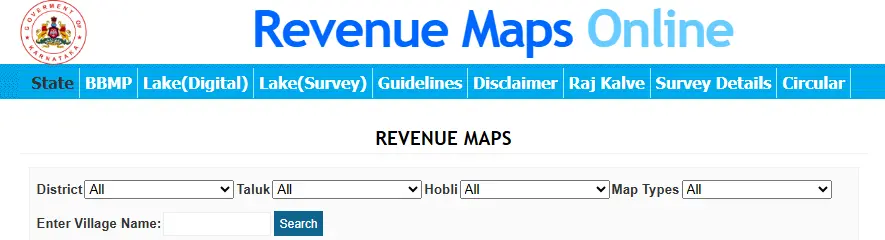
- Select Map Type: Choose the type of map you need (e.g., Cadastral Map or Geo-Referenced Map).
-
View Map List:
Once you have entered the details, a list of available revenue maps for that village will be displayed on the screen.
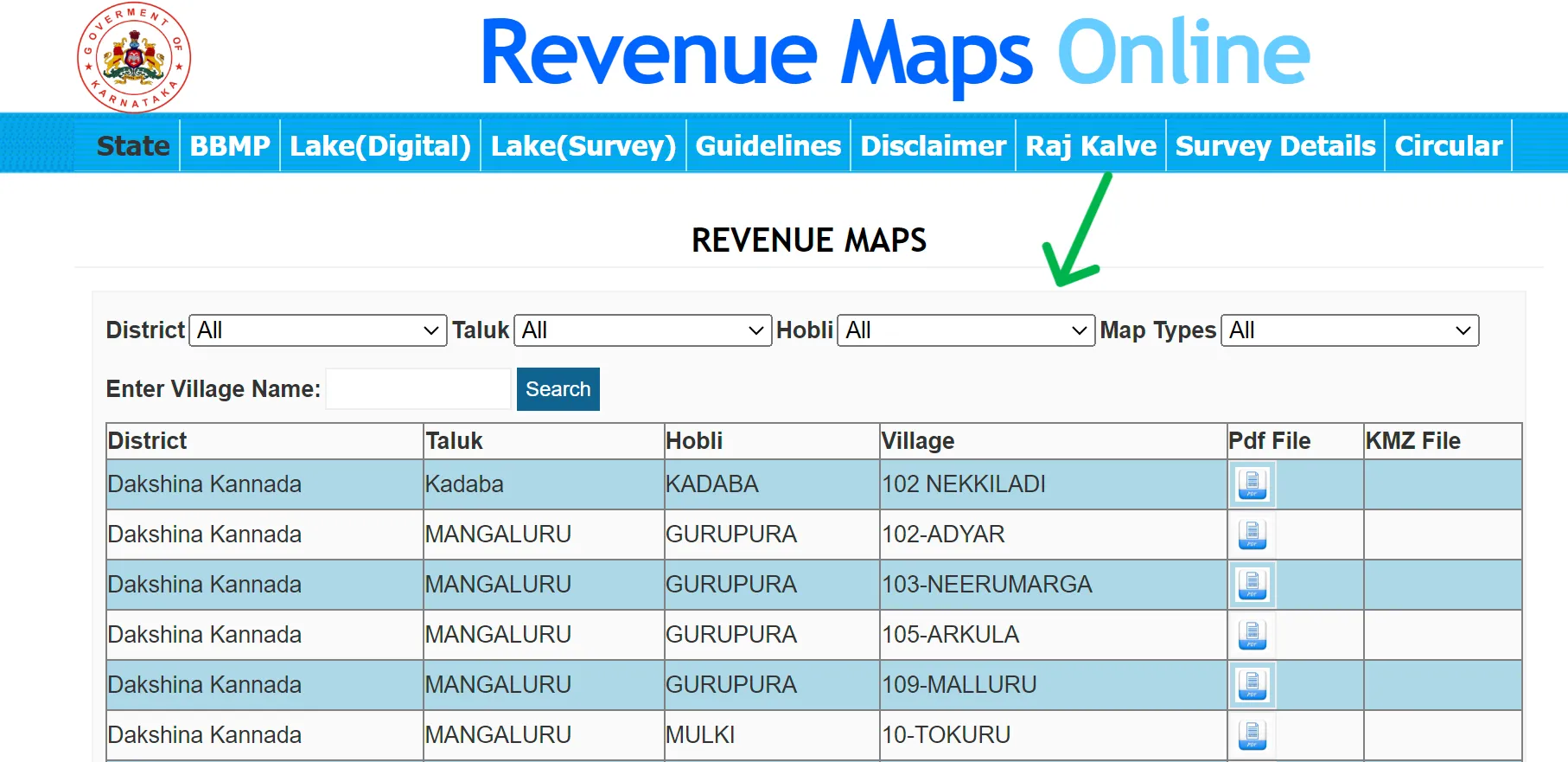
- View or Download the Map: Look for the PDF icon next to the specific map entry. Click it to view the map in your browser. You can then use the download or print icons within the PDF viewer to save a copy for your records.
By following these steps, you can easily obtain a visual layout of land boundaries and survey numbers through the Bhoomi portal.
Bhoomi RTC Details Every Land Owner Must Know (2026 Update)
1. The "Aadhaar Seeding" Requirement (New for 2026)
The Karnataka government is now pushing heavily for Aadhaar-to-RTC linking to prevent land fraud.
- Why it matters: In the future, you may not be able to sell land or apply for subsidies if your Aadhaar isn't linked to your land record.
- How to do it: Users can't do this entirely online yet. Mention that they must visit their Village Administrative Officer (VAO) with their Aadhaar card and a copy of their RTC to complete the "seeding" process.
2. Using the "Dishaank" App
Mentioning the Dishaank app adds a lot of value for people physically standing on a piece of land.
- The Benefit: While Bhoomi gives you the text record, Dishaank uses your phone’s GPS to show you exactly which survey number you are standing on.
- Practical Tip: Suggest that buyers use Dishaank while visiting a plot to ensure the survey number on the RTC matches the physical location they are looking at.
3. Difference between "Khata" and "RTC"
This is a huge point of confusion for many.
- RTC (Pahani): For agricultural and rural lands (managed by the Revenue Department).
- Khata: For urban properties/sites (managed by BBMP or local municipalities) for the purpose of paying property tax.
Why mention this? Users often search for their city apartment on the Bhoomi portal and get frustrated when it doesn't show up. Clarifying this saves them time.
4. Understanding "Surnoc" and "Hissa"
Don't just tell users to "select" them; explain what they are in simple terms:
- Surnoc: Think of this as the "Main Division" of a large plot.
- Hissa: This is the "Sub-division." If a father divided his land among three sons, each son would have the same survey number but a different Hissa number (e.g., 1, 2, 3).
5. Mobile App vs. Website
Google loves mobile-first advice.
- Mention that there is an official Bhoomi App on the Google Play Store.
- Caveat: Warn users about fake/third-party apps that look official but are just filled with ads. Always tell them to look for the "Government of Karnataka" developer name.
Bhoomi Online Helpdesk
| Contact Method | Details |
|---|---|
| Email Address | bhoomi@karnataka.gov.in |
| Primary Helpline | 080-22113255 |
| Mobile Support | 8277864065, 8277864067, 8277864068 |
| Office Address | Bhoomi Monitoring Cell, SSLR Building, K.R. Circle, Bangalore – 560001 |
| Office Hours | 10:00 AM to 5:30 PM (On government working days) |
FAQ's
What is the Bhoomi Online Portal?
Bhoomi Online is the official land records website of the Karnataka government. It allows citizens to access land records digitally, replacing the old system of visiting government offices. You can view and download critical documents like the RTC (Record of Rights, Tenancy, and Crops) and ownership transfer records, making the process faster, more transparent, and more accessible for everyone.
How do I check an RTC by the owner's name?
If you do not have the survey number, you can still search for records. Visit the Bhoomi portal, navigate to the 'RTC Services' section, and select 'View RTC Information.' Choose the 'Owner-wise' search option, select your district and village, and enter the owner’s name to retrieve the relevant land details.
How can I check the status of a Mojini application?
To track the status of a survey request (Mojini), follow these steps:
Visit the official Bhoomi portal.
Click on the 'Mojini Services' tab under the Survey (SSLR) section.
Enter your Application Number or specific land details.
Click 'Fetch Status' to see the current progress of your survey request.
What is the difference between a regular RTC and an i-RTC?
A regular RTC viewed on the portal is for informational purposes only. An i-RTC is a digitally signed, official version of the document. While the online view is free, the i-RTC requires a small fee (approx. ₹10) and is the only version legally accepted by banks for loans and by courts as evidence of ownership.
Why should I link my Aadhaar to my land records?
The Karnataka government encourages Aadhaar Seeding to prevent property fraud. Linking your Aadhaar ensures that only the rightful owner can initiate land sales or mutations. It also makes it easier to receive direct government benefits, such as crop insurance or "Parihara" (disaster compensation), directly into your bank account.